How to Add BotDetect PHP CAPTCHA Protection to CodeIgniter 3 Applications
Adding BotDetect PHP Captcha protection to your CodeIgniter MVC applications requires a slightly different approach than adding it to basic PHP websites, but is still straightforward. This page will guide you through the necessary steps and explain the available options.
First Time Here?
Check the BotDetect CodeIgniter 3 Captcha Quickstart for key integration steps.
Prerequisites
Table of Contents
- The BotDetect CodeIgniter download package
- Include BotDetect in your CodeIgniter application
- Display BotDetect in your CodeIgniter View
- Validate the Captcha in your CodeIgniter Controller
The BotDetect CAPTCHA CodeIgniter Download Package
Because CodeIgniter is a MVC framework that leverages certain conventions to provide a rich set of functionality to PHP application developers, implementing BotDetect Captcha requires a layer of integration code to conform to those conventions. This enables BotDetect Captcha to integrate seamlessly into CodeIgniter applications and be used according to expectations of CodeIgniter developers.
Path Aliases Used Throughout This Guide
<MYCIAPP>: location of your working CodeIgniterapplicationdirectory<BDCIPACK>: the downloaded and extracted contents of the BotDetect Captcha CodeIgniter Package
For convenience purposes we are providing the BotDetect Captcha CodeIgniter integration code packaged as a CodeIgniter library.
You can get the whole BotDetect Captcha CodeIgniter integration package here. Included in this package is the integration code, a basic Captcha validation example, and an example showing use of BotDetect Captcha with CodeIgniter Form Validation.
(The BotDetect Captcha PHP Library is a required and separate download available here.)
The BotDetect CAPTCHA CodeIgniter Library
BotDetect CodeIgniter integration code, sans the Captcha library, is located at <BDCIPACK>/application/libraries/botdetect.
The integration package includes a wrapper class around the regular BotDetect Captcha Library for use in your application Controllers, by using the CodeIgniter library loader.
Also included are separate Controllers that handle:
- Captcha image, sound, and resources requests, which uses
http://<MYCIAPP>/botdetect/captcha-handlerUrls by default.
CodeIgniter Basic BotDetect CAPTCHA Example
This CodeIgniter 3 Basic Captcha example shows how to use the BotDetect Captcha library in your Controller and View code, and handling of basic Captcha user input validation.
- Controller:
<BDCIPACK>/codeigniter-3/ codeigniter_form_validation_captcha_example/application/controllers/ Example.php - View:
<BDCIPACK>/codeigniter-3/ codeigniter_form_validation_captcha_example/application/views/botdetect/ example.php - Config:
<BDCIPACK>/codeigniter-3/ codeigniter_form_validation_captcha_example/application/config/captcha.php
You can run the example above via its respective controller (http://<MYCIAPP>/example).
CodeIgniter Form Validation BotDetect CAPTCHA Example
This CodeIgniter 3 form validation Captcha example shows you how to use BotDetect Captcha with CodeIgniter form and validation functionality by implementing a simple contact form.
- Controller:
<BDCIPACK>/codeigniter-3/ codeigniter_form_validation_captcha_example/application/controllers/ Contact.php - View:
<BDCIPACK>/codeigniter-3/ codeigniter_form_validation_captcha_example/application/views/botdetect/ contact.php - Config:
<BDCIPACK>/codeigniter-3/ codeigniter_form_validation_captcha_example/application/config/captcha.php
You can run the example above via its respective controller (http://<MYCIAPP>/contact).
CodeIgniter Bit Auth CAPTCHA Example
This CodeIgniter 3 Bit Auth CAPTCHA code example shows you how to use BotDetect Captcha with Bit Auth library.
- Controller:
<BDCIPACK>/codeigniter-3/codeigniter_bit_auth_captcha_example /application/controllers/Example.php
- View:
<BDCIPACK>/codeigniter-3/codeigniter_bit_auth_captcha_example /application/views/example/login.php<BDCIPACK>/codeigniter-3/codeigniter_bit_auth_captcha_example /application/views/example/add_user.php
- Config:
<BDCIPACK>/codeigniter-3/codeigniter_bit_auth_captcha_example /application/config/captcha.php
You can run the examples above via their respective controllers (http://<MYCIAPP>/example/login, http://<MYCIAPP>/example/register).
CodeIgniter Ion Auth CAPTCHA Example
This CodeIgniter 3 Ion Auth CAPTCHA code example shows you how to use BotDetect Captcha with Ion Auth library.
- Controller:
<BDCIPACK>/codeigniter-3/codeigniter_ion_auth_captcha_example /application/controllers/Auth.php
- View:
<BDCIPACK>/codeigniter-3/codeigniter_ion_auth_captcha_example /application/views/auth/login.php<BDCIPACK>/codeigniter-3/codeigniter_ion_auth_captcha_example /application/views/auth/forgot_password.php
- Config:
<BDCIPACK>/codeigniter-3/codeigniter_ion_auth_captcha_example /application/config/captcha.php
You can run the examples above via their respective controllers (http://<MYCIAPP>/auth/login, http://<MYCIAPP>/auth/forgot_password).
CodeIgniter Tank Auth CAPTCHA Example
This CodeIgniter 3 Tank Auth CAPTCHA code example shows you how to use BotDetect Captcha with Tank Auth library.
- Controller:
<BDCIPACK>/codeigniter-3/codeigniter_tank_auth_captcha_example /application/controllers/Auth.php
- View:
<BDCIPACK>/codeigniter-3/codeigniter_tank_auth_captcha_example /application/views/auth/login.php<BDCIPACK>/codeigniter-3/codeigniter_tank_auth_captcha_example /application/views/auth/register.php<BDCIPACK>/codeigniter-3/codeigniter_tank_auth_captcha_example /application/views/auth/forgot_password.php
- Config:
<BDCIPACK>/codeigniter-3/codeigniter_tank_auth_captcha_example /application/config/captcha.php
You can run the examples above via their respective controllers (http://<MYCIAPP>/auth/login, http://<MYCIAPP>/auth/register, and http://<MYCIAPP>/auth/forgot_password).
Feel free to copy the whole preconfigured CodeIgniter application from the BotDetect Captcha CodeIgniter Package somewhere on your development web server and examine it there.
1. Include BotDetect CAPTCHA in Your CodeIgniter MVC Application
Copy the Necessary BotDetect CAPTCHA Files
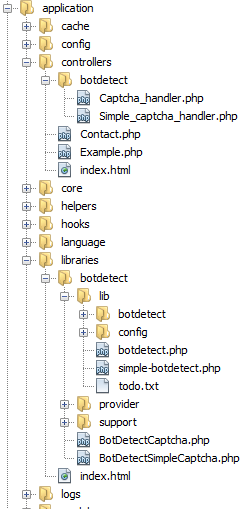
The base BotDetect Captcha library and CodeIgniter MVC Captcha integration code are distributed separately and need to be merged so you can use them in your CodeIgniter application.
1. BotDetect CodeIgniter Integration Code
Copy (the whole directory and all contents)<BDCIPACK>/plugin/codeigniter-3/to
libraries/botdetect/
<MYCIAPP>/application/libraries/botdetect/
2. BotDetect CodeIgniter CAPTCHA Handlers
Copy<BDCIPACK>/plugin/codeigniter-3/to
controllers/botdetect/
<MYCIAPP>/application/controllers/botdetect/
3. Base BotDetect CAPTCHA Library
Copy (the whole directory and all contents)<BDCIPACK>/lib/to
<MYCIAPP>/application/libraries/botdetect/lib/
A Note On PHP Session Persistence
The BotDetect Captcha Library requires persistent per-user server storage to work properly.
The CodeIgniter session library uses user cookies to store data by default. Since client-side persistence can not be considered safe enough for Captcha purposes (as explained in the BotDetect FAQ), BotDetect uses standard PHP Sessions instead. In case you application does not provide a $_SESSION superglobal at the time of accessing Captcha functionality, the Captcha library integration wrapper also calls session_start() when it's loaded. This provides a safe default that works in most usage scenarios.
If your CodeIgniter application is handling Sessions in a non-standard way (i.e. there is no PHP $_SESSION available), you can implement your own Captcha persistence methods via provided BotDetect Captcha persistence hooks in the lib/botdetect/CaptchaConfigDefaults.php file.
2. Display BotDetect CAPTCHA In Your CodeIgniter View
Before displaying the Captcha in your View, the related Controller needs to load the BotDetect component and set a proper name for your Captcha instance. It also needs to pass the Captcha markup to the View, which can then display it alongside other form elements.
Register default route of the Captcha library:
$route['botdetect/captcha-handler'] = 'botdetect/captcha_handler/index';
Captcha configuration options
<?php
// BotDetect PHP Captcha configuration options

$config = array(
  // Captcha configuration for example page
  'ExampleCaptcha' => array(
    'UserInputID' => 'CaptchaCode',
    'ImageWidth' => 250,
    'ImageHeight' => 50,
  ),

);
In order to use BotDetect CAPTCHA CodeIgniter Library, you must declare Captcha configuration in config/captcha.php file following the structure given above. The ExampleCaptcha is an example name and will be used when loading the library in your controller, you should pick a name that best matches your usage scenario like: LoginCaptcha, ContactCaptcha, etc. You can find a full list of available Captcha configuration options and related instructions at the Captcha configuration options page.
In case you need different Captcha for another form in your application, here is the example how to add additional captcha configuration for a login form:
<?php
// BotDetect PHP Captcha configuration options

$config = array(
  // Captcha configuration for example page
  'ExampleCaptcha' => array(
    'UserInputID' => 'CaptchaCode',
    'ImageWidth' => 250,
    'ImageHeight' => 50,
  ),

  // Captcha configuration for login page
  'LoginCaptcha' => array(
    'UserInputID' => 'CaptchaCode',
    'CodeLength' => CaptchaRandomization::GetRandomCodeLength(4, 6),
    'ImageStyle' => array(
      ImageStyle::Radar,
      ImageStyle::Collage,
      ImageStyle::Fingerprints,
    ),
  ),

);
Load the BotDetect CAPTCHA CodeIgniter Library
The BotDetect MVC Captcha CodeIgniter library uses the usual method of loading CodeIgniter libraries.
public function index() // Your controller
{
  // load the BotDetect Captcha library and set its parameter
  $this->load->library('botdetect/BotDetectCaptcha', array(
    'captchaConfig' => 'ExampleCaptcha'
  ));
The BotDetect MVC Captcha library is available in CodeIgniter controller code as the $this->botdetectcaptcha object. It's loaded using the library loader in your Controller action and required to declare captchaConfig option, then assign it a captcha configuration key defined in config/captcha.php file. Each individual Controller action including Captcha validation should use a unique captchaConfig value to avoid persistence name clashes.
Pass the BotDetect CAPTCHA HTML Markup to the CodeIgniter View
The CodeIgniter MVC Captcha library generates its own markup, which should be made available to your View. The Captcha Html is retrieved by calling the Html() method on the $this->botdetectcaptcha object. It is then made available to the view by setting a variable in the $data[] array, which is later passed on to the view.
public function index() // Your controller
{
  // load the BotDetect Captcha library and set its parameter
  $this->load->library('botdetect/BotDetectCaptcha', array(
    'captchaConfig' => 'ExampleCaptcha'
  ));

  // make Captcha Html accessible to View code
  $data['captchaHtml'] = $this->botdetectcaptcha->Html();
The Captcha markup is now available inside your View's $captchaHtml variable.
Compose Your CodeIgniter View With BotDetect CAPTCHA Display
Inside your View script, you should include some form elements alongside the Captcha display. You can use either straight markup or the CodeIgniter Form Helper. In a regular form with a submit button, you need an input field where the user retypes the characters shown in the Captcha image.
You display the image by outputting the $captchaHtml variable from the previous step:
<?php echo form_open('example'); ?>

<label for="CaptchaCode">Please retype the characters from the image:</label>
<?php echo $captchaHtml; ?>
<input type="text" name="CaptchaCode" id="CaptchaCode" value="" size="50" />

<div><input type="submit" value="Submit" /></div>
You also need to include the BotDetect Captcha layout style sheet in the <head> of your page containing the Captcha:
<head>

  […]

<link type="text/css" rel="Stylesheet" href="<?php
  echo CaptchaUrls::LayoutStylesheetUrl()
 ?>" />
The Captcha should now be visible and functioning in your View.
3. Validate the CAPTCHA In Your CodeIgniter Controller
After your Captcha is displayed alongside a form input field, you will want to validate the user submitted Captcha code in the Controller action. This should always be done before any sensitive processing, to confirm the submitted data is actually entered by a person and not a bot.
Validate the Submitted CAPTCHA Code User Input
The validation of Captcha code input should be done in the Controller->Action that is on the receiving end of the form submission (where the form action points to).
Usually, the submitted form data is available inside the CodeIgniter input object, by the same name you gave the Captcha code input field on the form where it was displayed. For example: $this->input->post("CaptchaCode").
It is then a matter of calling the Validate() method of the Captcha library object and passing it the user input.
// assuming "CaptchaCode" input field id
$isHuman = $this->botdetectcaptcha->Validate($code);
Handle CAPTCHA Validation Failure / Success
You should then write some code to handle both Captcha validation success and failure. If it failed, you should abort further processing and display an error message; if it succeeded, you can proceed with the protected form action:
if ($isHuman) {
  // TODO: Captcha validation passed:
  // continue with form processing, knowing the submission was made by a human
} else {
  // TODO: Captcha validation failed:
  // abort sensitive action, return an error message
}
This will ensure that the sensitive action can not be automated and is only performed when a human fills out the form.
Current BotDetect Versions
-
BotDetect ASP.NET CAPTCHA
2019-07-22v4.4.2 -
BotDetect Java CAPTCHA
2019-07-22v4.0.Beta3.7 -
BotDetect PHP CAPTCHA
2019-07-22v4.2.5