CakePHP 3 Form Model Validation BotDetect CAPTCHA Example
This code example shows how to integrate BotDetect PHP Captcha validation and
CakePHP data validation
functionality. It uses Cake's FormHelper
and Model validation, which provide a lot of out-the-box functionality when used together.
First Time Here?
Check the BotDetect CakePHP 3 Captcha Quickstart for key integration steps.
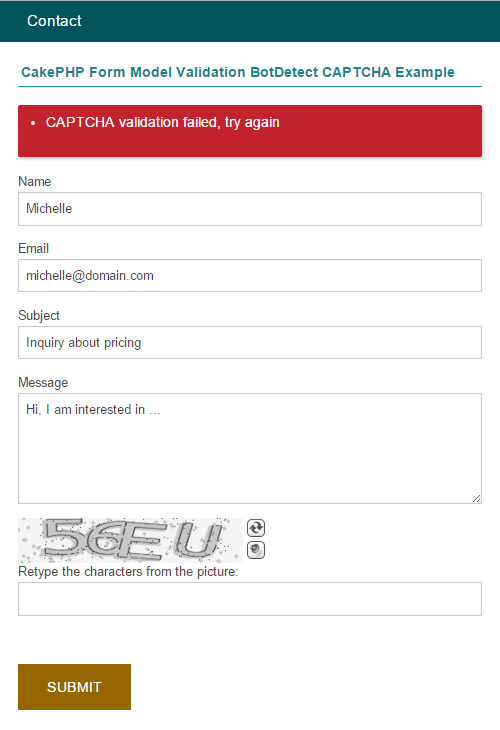
The example is based around a contact form which sends email if the user input is considered valid – a likely real world scenario for Captcha protection integration.
Files for this ('bd-captcha-cakephp-3-examples') example:
/config/captcha.php/src/Template/Contact/index.ctp/src/Model/Validation/ContactValidator.php/src/Controller/ContactController.php
The files are available for download as a part of the BotDetect Captcha CakePHP integration package.
Config – /config/captcha.php
<?php if (!class_exists('CaptchaConfiguration')) { return; }

// BotDetect PHP Captcha configuration options

return [
  // Captcha configuration for contact page
  'ContactCaptcha' => [
    'UserInputID' => 'CaptchaCode',
    'CodeLength' => CaptchaRandomization::GetRandomCodeLength(4, 6),
    'ImageStyle' => ImageStyle::AncientMosaic,
  ],

];
In order to use the CakePHP CAPTCHA Plugin, we have declared Captcha configuration which will be used when loading Captcha component in ContactController. Detailed description of this approach is available in a BotDetect CakePHP 3 integration guide.
View – /src/Template/Contact/index.ctp
<!-- include the BotDetect layout stylesheet -->
<?= $this->Html->css(captcha_layout_stylesheet_url(), ['inline' => false]) ?>

<div class="users form">

  <?= $this->Form->create(null, ['url' => ['controller' => 'contact', 'action' => 'index']]) ?>

  <fieldset>
    <legend><?= __('CakePHP Form Model Validation BotDetect CAPTCHA Example') ?></legend>

    <?php
      // show error messages
      if (!empty($errors)) {
        echo '<div class="cake-error"><ul>';
        foreach ($errors as $e) {
          echo '<li>' . reset($e) . '</li>';
        }
        echo '</ul></div>';
      }
    ?>

    <?= $this->Form->input('name') ?>
    <?= $this->Form->input('email') ?>
    <?= $this->Form->input('subject') ?>
    <?= $this->Form->input('message', ['type' => 'textarea']) ?>

    <!-- show captcha image html -->
    <?= captcha_image_html() ?>

    <!-- Captcha code user input textbox -->
    <?= $this->Form->input('CaptchaCode', [
      'label' => 'Retype the characters from the picture:',
      'maxlength' => '10',
      'id' => 'CaptchaCode'
    ]) ?>

  </fieldset>

  <?= $this->Form->button(__('Submit'), ['style' => 'float: left; margin-left: 20px;']) ?>
  <?= $this->Form->end() ?>
 </div>
The View part of this example is straightforward. The
FormHelper creates input fields of proper
type and length in conjuction with the Model. We display the image by calling the captcha_image_html() helper function, and the View utilizes the
HtmlHelper::css() method to
add the required stylesheet.
Model – /src/Model/Validation/ContactValidator.php
<?php namespace App\Model\Validation;

use Cake\Validation\Validator;

class ContactValidator extends Validator {

  public function __construct()
  {
    parent::__construct();

      $this
      ->notEmpty('name', 'The name field cannot be left empty')

      ->notEmpty('subject', 'The subject field cannot be left empty')
      ->add('subject', 'length', [
        'rule' => ['minLength', 10],
        'message' => 'Name must be at least 10 characters'
      ])

      ->notEmpty('email', 'The email field cannot be left empty')
      ->add('email', 'validFormat', [
        'rule' => 'email',
        'message' => 'The email must be a valid email address'
      ])

      ->notEmpty('message', 'The message field cannot be left empty')
      ->add('message', 'length', [
        'rule' => ['minLength', 20],
        'message' => 'Message must be at least 20 characters'
      ])

      ->notEmpty('CaptchaCode', 'The captcha code field cannot be left empty')
      ->add('CaptchaCode', 'validCaptcha', [
        'rule' => function($value) {
          return captcha_validate($value);
        },
        'message' => 'CAPTCHA validation failed, try again'
      ]);
  }
}
The Model implements a custom rule and uses a closure for the CaptchaCode field. The closure wraps BotDetect Captcha validation calls and provides the result to the CakePHP Data Validation.
Controller – /src/Controller/ContactController.php
<?php namespace App\Controller;

use Cake\Controller\Controller;
use App\Model\Validation\ContactValidator;

class ContactController extends Controller
{
  public function initialize()
  {
    parent::initialize();

    $this->loadComponent('Flash');

    // load the Captcha component and set its parameter
    $this->loadComponent('CakeCaptcha.Captcha', [
      'captchaConfig' => 'ContactCaptcha'
    ]);
  }

  public function index()
  {
    if ($this->request->is('post')) {

      $validator = new ContactValidator();

      $errors = $validator->errors($this->request->data());

      // clear previous user input, since each Captcha code can only be validated once
      unset($this->request->data['CaptchaCode']);

      if (empty($errors)) {
        // Captcha validation passed
        // TODO: send email
        $this->Flash->success('Your message was sent successfully');

        $this->redirect(['action' => 'index']);
      } else {
        $this->set('errors', $errors);
      }
    }
  }
}
The Controller part of the example provides the necessary helpers and data for the View to use, adding Captcha validation functionality as outlined in the BotDetect CakePHP 3 integration guide.
After loading the BotDetect Captcha CakePHP component, the $this->request variable is checked to see if the form was submitted or not. The form data is encapsulated in the $this->request->data array, and which the FormHelper creates automatically. The user-entered Captcha code coresponds to the CaptchaCode field inside that array.
Notice that the code proceeds to send the email only if the whole ContactValidator state validates, which includes the Captcha validation result we provided from inside of the model.
Current BotDetect Versions
-
BotDetect ASP.NET CAPTCHA
2019-07-22v4.4.2 -
BotDetect Java CAPTCHA
2019-07-22v4.0.Beta3.7 -
BotDetect PHP CAPTCHA
2019-07-22v4.2.5